How it works

From the first take to the first cut, without missing a moment.

WedCut does the heavy lifting of your wedding edit in three moves. You choose the style and finish the art in your NLE: Final Cut, DaVinci Resolve or Premiere.

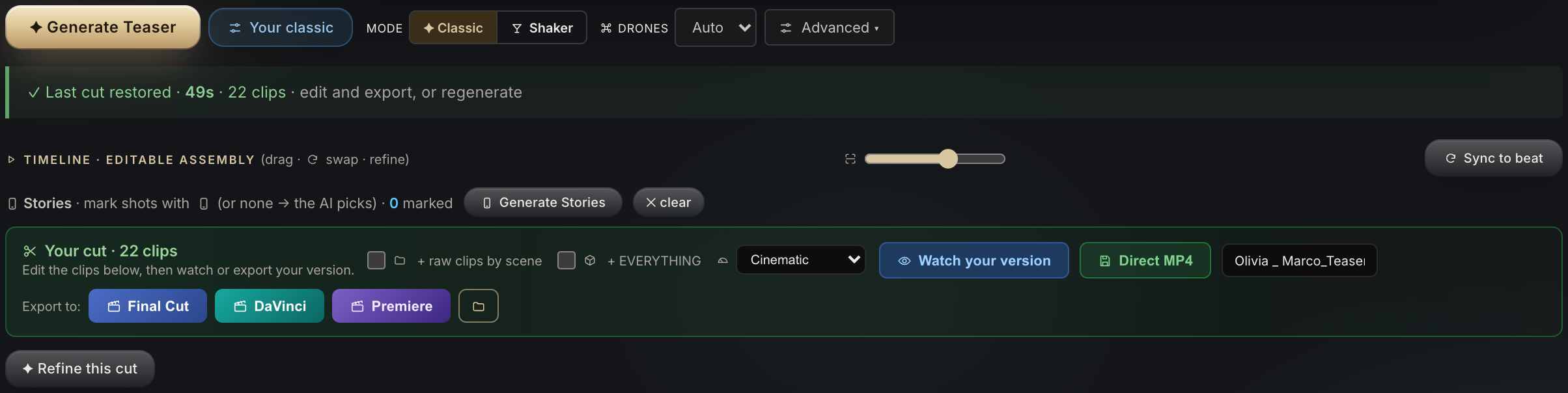
Panel de generación de WedCut: Generar Teaser, modos Clásico y Coctelera, timeline con guion editable, Stories y export directo a MP4
01 · Import

Your footage

Folders or cards, one or several cameras. Everything stays on your computer.

02 · Analyze & assemble

Selection + first cut

The AI culls and builds the edit in the style you choose.

03 · Export

Editable in your NLE

FCPXML + EDL to Final Cut, Resolve or Premiere.

Footage selection

The cull that steals hours, in minutes

WedCut looks at every clip —scene, moment, emotion, technical quality and recording time— and floats the good ones to the top. From 2,000 takes to the ~150 good ones, without dragging the cursor all afternoon or missing the shot you forgot you had.

By far, this is where you recover the most time.

It recognizes the moments that matter

It doesn't just tell a "good shot": WedCut understands what's happening. It scores the emotion of each clip and detects the milestones of the day to land the cut on its peak — the kiss, the vows, the tears, the laughter, the ring exchange.

The "I do"Ring exchangeThe arrasFirst kissTearsLaughterHugsFirst danceThe bouquetGuest reactionsDrone / B-roll

Edit in whatever style you want

Same footage, three ways to cut it. You choose before generating.

Teaser, highlight or film: everything you can generate →

The house style — the cut of a professional wedding editor· Your style — the app adapts to how you edit· Random — variants to explore
WedCut — Pool Review
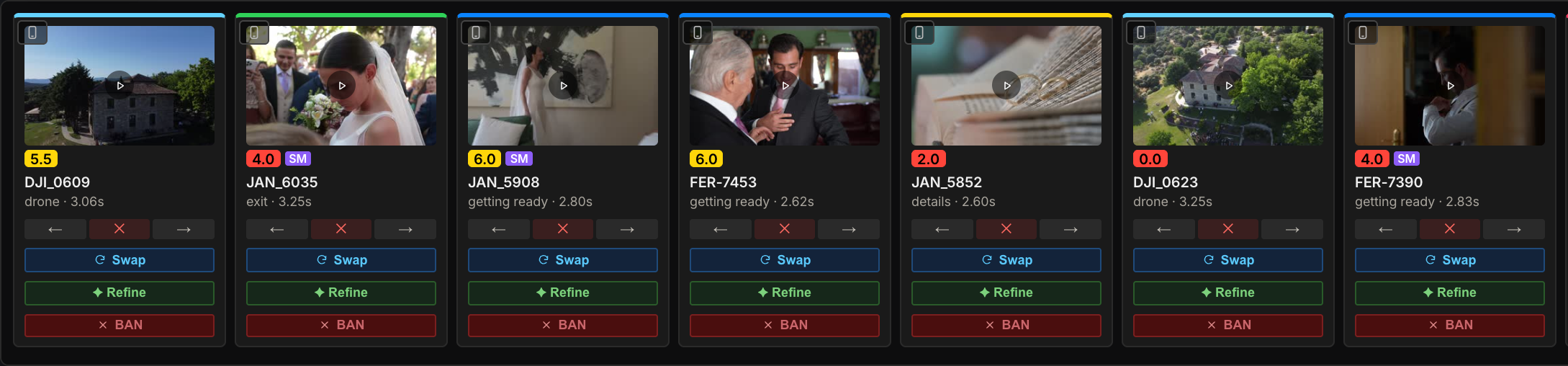
Pool Review de WedCut: selección de brutos con miniaturas, score y estilos

And on top of that…

All the heavy lifting of wedding editing, in a single tool.

Music

Cut to the beat (BPM)

It detects the tempo and cuts on the pulse and the emotional peak.

Voice

Cut by phrase

Lands the image on the exact phrase of vows, readings and speeches.

Cameras

Several cameras

Syncs your cameras' clocks and orders all the footage by real time of day.

Export

3 editors

FCPXML + EDL to Final Cut, DaVinci Resolve or Adobe Premiere.

Your editor

The whole wedding, sorted

Besides the edit, all your takes in folders by scene and already tagged: ceremony, party, couple, drone…

Search

Search by what was said

Find the kiss, the tears — or an exact phrase said in the vows.

Control

You call the shots

Mark clips green or red and ask for substitutes: the edit is rebuilt with your decisions.

Language

Spanish and English

The whole app, in English too.

Frequently asked questions

How does it select the footage?+

The AI looks at each clip (scene, moment, emotion, quality and recording time) and floats the good ones to the top. You stop scrubbing thousands of clips; you review an already curated selection.

What are the styles?+

Before editing you choose how to cut: the house style (the cut of a professional wedding editor), your own style (by adjusting WedCut to how you edit), or random to explore variants.

Does it give me a video or something editable?+

Editable. It exports FCPXML and EDL: the first cut assembled in your Final Cut, DaVinci Resolve or Adobe Premiere timeline. And if you want, the same file carries ALL your takes in folders by scene, already tagged, so you can swap or add shots without leaving your editor.

Do my videos get uploaded to the cloud?+

No. WedCut is local (Mac & PC): your clients' footage never leaves your machine. Only the analysis travels, metered.

What do I need to run it?+

A Mac with Apple silicon (M1 or later), an Intel Mac, or a Windows 10/11 PC.

Do I need a powerful computer?+

An editing Mac or PC is enough. Being local, you use your own hardware and don't wait in server queues.
Try it with your own wedding.

Now available for Mac and PC.